TABLE OF CONTENTS
What are Pricing Configurations?
When building a Package in Droptop, every Service you add to the comes with three configurable settings:
- Inventory Refiners
- Product Quantities
- Pricing Configurations
Pricing Configurations determine how you will charge - or upcharge - for the parts and fluids used in a service. Rather than setting a fixed price per item, Pricing Configurations let you define the charging logic: whether a part is added at retail, at cost, at a custom dollar amount, or based on how much fluid the vehicle actually takes.
This is done through two components:
- Pricing Badges - define the pricing logic
- Tag Configurations - optionally narrow a pricing badge so it only applies to inventory items with a specific Tag
If you add more than one Pricing Configuration to a service, each inventory item used during servicing will present you with a choice of which configuration to apply. This is useful when different parts or fluids in the same service need to be charged differently.
What are Pricing Badges?
Pricing Badges are the core of a Pricing Configuration. Each badge defines a specific pricing rule that determines what and how items are charged when a part or fluid is added to an order.
Here is how they work:
- You can apply a Pricing Badge to all inventory items associated with a service.
- Or, by associating a Tag with a Pricing Badge, you can target only the specific inventory items that carry that Tag.
- You can add multiple Pricing Badges to a single service. When multiple badges are configured, each inventory item will give you a choice of which pricing option to apply.
Tag Configurations allow you to apply a Pricing Badge's rule to specific inventory items only. A Tag can be assigned to individual inventory items in the Inventory Module (when adding or editing an item) - this is referred to as "Tagging" an inventory item.
When a Pricing Badge has a Tag associated with it, its pricing rule will only apply to inventory items carrying that Tag.
When a tagged inventory item is added to an order, the Tag name will appear on the order invoice and receipt.
What does each Pricing Badge do?
There are 9 types of Pricing Badges.
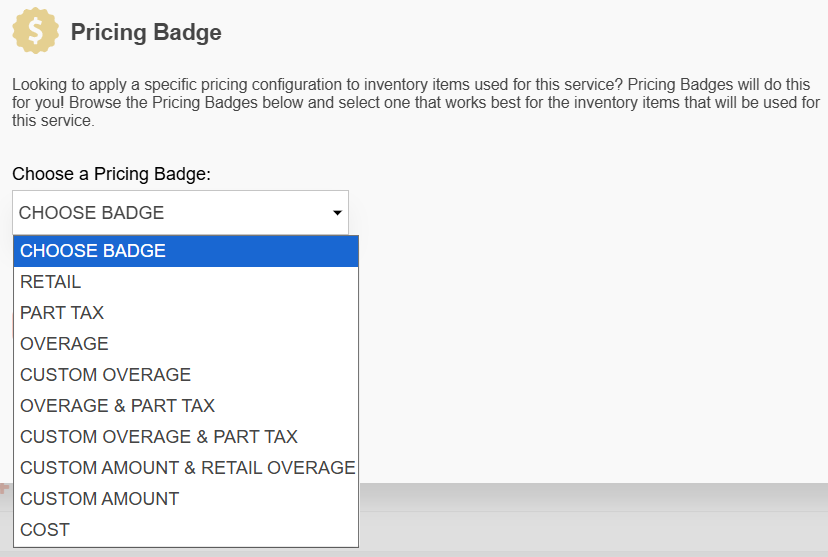
Overage badges apply only to fluids (commonly oils). All other badges apply to parts.
Pricing Badge | Definition |
RETAIL | The part or fluid is sold at inventory retail on top of the package total. |
PART TAX | Each time you add a part to an order, there is no change to the overall package price. This badge only adds the retail value of the part into the tax calculation. |
OVERAGE | Your specified value is the amount of fluid that is included in the package price. Additional units over the specified value are charged at retail price. |
CUSTOM OVERAGE | Your specified value is the amount of fluid that is included in the package price.
Additional units over the included amount of fluid are charged at a rate of your specified dollar amount. |
OVERAGE + PART TAX | Your specified value is the amount of fluid included in the package price. Additional units over the specified value are charged at retail price. |
CUSTOM OVERAGE + PART TAX | Each time you add a part or fluid to an order, any amount over the included quantity is charged at a custom price you define and added to the package total. |
CUSTOM AMOUNT + RETAIL OVERAGE | Your specified dollar amount is what you’re charging for fluid that is included in the package price.
Additional units over the included amount of fluid are charged at retail. |
CUSTOM AMOUNT | Each time you add a part to an order, a custom amount will be added to the package total. |
COST | The part or fluid is sold at inventory cost on top of the package total. |
Common Use Case Examples
| RETAIL | Example 1: A filter is charged at its inventory retail price, which is added on top of the package price. For example, the filter retails at $15 and the package price is $90. The customer pays $105. Example 2: Engine Oil Filter Remove & Replace  Using the same package, you can apply a Tag to specify that only certain filters are charged at retail. Filters without the Tag are included in the package price, while only filters tagged "Special Filter" are charged at retail on top of the package. For example, most filters ($15) are included in the $90 package price - the customer pays $90. If a Special Filter tagged filter costs $15, the customer pays $105 ($90 + $15). |
| PART TAX | Engine Oil Filter Remove & Replace If a filter's retail value is $15 and the package is $90, the package price doesn't change with the filter added. However, the filter's retail value is factored into the tax calculation. If tax is 13% and the package is taxable, the customer pays $90. When taxes are calculated, the filter tax ($1.95) is added on top. |
| OVERAGE | Engine Oil Drain & Refill
5 quarts of oil are included in the package. Additional quarts are charged at retail price. The package price is $90 and the inventory retail price of oil is $10 per quart. 5 quarts are already included. If a vehicle takes 6 quarts, the customer pays $100 ($90 + $10 for the sixth quart). |
| CUSTOM OVERAGE | Engine Oil Drain & Refill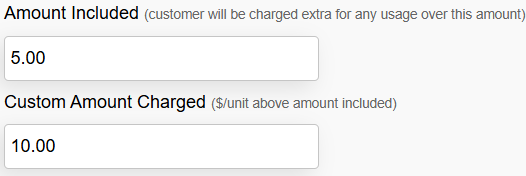  Similar to the Overage configuration, but instead of charging retail for the overage, you set a custom per-unit rate. The package price is $90 and 5 quarts are included. If a vehicle takes 6 quarts and your custom overage rate is $10 per quart, the customer pays $100 ($90 + $10 for the sixth quart). |
| OVERAGE + PART TAX | Engine Oil Drain & Refill  Similar to the Overage pricing configuration above, but you are adding the retail value of oil overage in the tax calculation. |
| CUSTOM OVERAGE + PART TAX | Engine Oil Drain & Refill Similar to Custom Overage pricing configuration above, but you are also adding the retail value of oil overage in the tax calculation for the first 5 quarts and the custom amount for the additional quarts Similar to Custom Overage pricing configuration above, but you are also adding the retail value of oil overage in the tax calculation for the first 5 quarts and the custom amount for the additional quarts |
| CUSTOM AMOUNT + RETAIL OVERAGE | Engine Oil Drain & Refill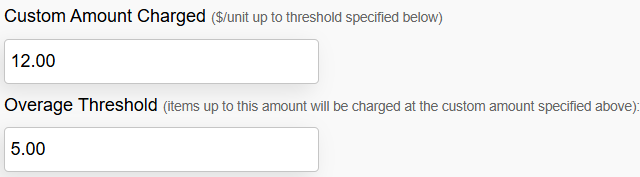 The package price is $70. The retail price is $10. The first 5 quarts are charged at a custom amount of $12 per quart (maximum is $60), and additional quarts are charged at retail price. Example 1:  If a vehicle takes 7.5 quarts, the customer pays $95 ($70 + $25 for the additional 2.5 quarts). If a vehicle takes 7.5 quarts, the customer pays $95 ($70 + $25 for the additional 2.5 quarts).Example 2: 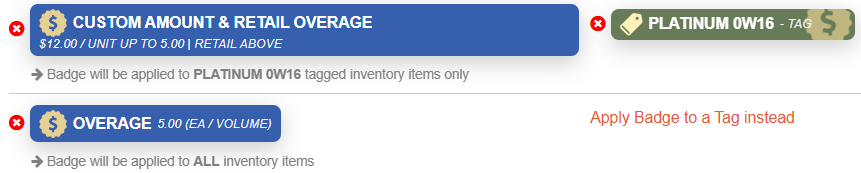 The pricing badge only applies to items that are tagged "Platinum 0W16". This is helpful if your cost for select oils (e.g. Pennzoil Platinum 0W16) are higher than others. The pricing badge only applies to items that are tagged "Platinum 0W16". This is helpful if your cost for select oils (e.g. Pennzoil Platinum 0W16) are higher than others.In this case, the customer pays $95 if the oil used is tagged "Platinum 0W16". If other oils are used, then the Overage pricing badge applies, where the customer would pay $75 ($70 package with 5 quarts included + $25 for 2.5 quarts overage at $10 retail value). Example 3:  The pricing badge only applies to parts tagged "Pennzoil Platinum". It will charge $12 per quart for the first 5 quarts and anything over 5 quarts will be charged the inventory retail pricing badge The pricing badge only applies to parts tagged "Pennzoil Platinum". It will charge $12 per quart for the first 5 quarts and anything over 5 quarts will be charged the inventory retail pricing badgeThere are no other pricing badges configured for this service, then oils other tagged items are included in the package price. The customer would only not pay extra. |
| CUSTOM AMOUNT | Antifreeze/Coolant Top up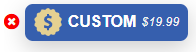 A package may include multiple services (e.g., oil change, filter replacements, and fluid top-ups). The package price is $90 and the Antifreeze/Coolant Top Up has a Custom Amount pricing badge of $19.99. If no other services have pricing configurations, the customer pays $119.99. A package may include multiple services (e.g., oil change, filter replacements, and fluid top-ups). The package price is $90 and the Antifreeze/Coolant Top Up has a Custom Amount pricing badge of $19.99. If no other services have pricing configurations, the customer pays $119.99. |
| COST | Engine Oil Pan Drain Plug Gasket Remove & Replace 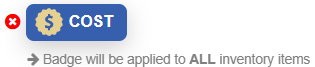 By using the Cost pricing badge, the part(s) will be sold at inventory cost value on top of the package price. By using the Cost pricing badge, the part(s) will be sold at inventory cost value on top of the package price.For example, Drain Plugs in your inventory are listed at $3.00 cost and $12.99 retail, and the package price is $0, then the customer would pay $3. |


Was this article helpful?
That’s Great!
Thank you for your feedback
Sorry! We couldn't be helpful
Thank you for your feedback
Feedback sent
We appreciate your effort and will try to fix the article