TABLE OF CONTENTS
- What Are Inventory Refiners?
- Types of Inventory Refiners
- Why Set Up Inventory Refiners?
- Examples of Inventory Refiners
What Are Inventory Refiners?
When building a Package in Droptop, each Service includes three configurable settings:
- Inventory Refiners
- Product Quantities
- Pricing Configurations
When you add a Service to a Package, you can configure Inventory Refiners to control which inventory items are displayed during the ticket workflow.
Types of Inventory Refiners
There are four types of refiners available:
- Tag: Filters inventory by specific tags assigned to items in Inventory. This is useful for displaying items such as diesel oils, specific brands, or premium parts that may carry an upcharge.
- Part Type: Filters inventory by servicing item type, such as oils, filters, wipers, bulbs, and other parts.
- Oil Formulation: Filters engine oils by formulation
- Viscosity: Filters engine oils by viscosity
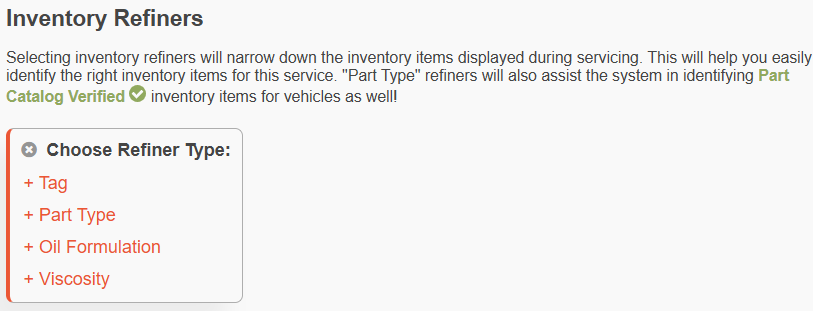
Multiple refiners can be combined using AND and OR logic to control exactly which inventory items are displayed.
- OR Logic: Creates separate groups of criteria. Inventory matching any group will be displayed.
- AND Logic (Sub-Refiners): Adds additional requirements within a group. Inventory must meet all conditions within that group to be displayed.
This allows you to create highly specific inventory filters while still providing flexibility when needed.
Why Set Up Inventory Refiners?
If no refiners are configured, Droptop will automatically suggest default Part Type refiners based on the Service. While this helps identify relevant inventory, it may still display a large number of items, making it more difficult to locate the correct part or fluid.
Properly configured refiners help:
- Reduce the number of inventory items displayed.
- Make it easier to select the correct part or fluid.
- Improve workflow efficiency.
- Assist the system in identifying Catalog Verified inventory items when using Part Type refiners.
Examples of Inventory Refiners
Common Oil Change Packages
| Package - Oil Change | Services & Inventory Refiners | |
| Conventional / Full Synthetic / Synthetic Blend | - Engine Oil Drain & Replace - Part Type: Engine Oil AND + Sub-refiner - Oil formulation: Conventional / Full Synthetic / Synthetic Blend - Engine Oil Filter Remove & Replace - Part Type: Engine Oil Filter | 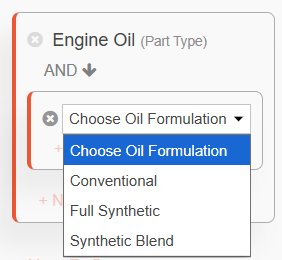 You can create specific oil blend packages by adding the Oil Formulation refiner. You can create specific oil blend packages by adding the Oil Formulation refiner.Having individual packages for each blend is helpful if the services are priced differently. |
| Synthetic Blend - High Mileage | - Engine Oil Drain & Replace - Part Type: Engine Oil OR + Sub-refiner - Tag: HIGH MILEAGE - Engine Oil Filter Remove & Replace - Part Type: Engine Oil Filter | 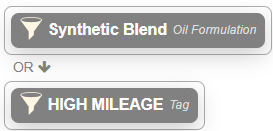 You can create oil packages where the system shows you all oils that match one or more refiners. You can create oil packages where the system shows you all oils that match one or more refiners.For example, it could show oil items from your inventory that are Synthetic formulation, or are tagged High Mileage. |
| Mobil 1 - Conventional | - Engine Oil Drain & Replace - Tag: MOBIL 1 AND + Sub-refiner - Part Type: Engine Oil AND + Sub-refiner - Oil formulation: Conventional - Engine Oil Filter Remove & Replace - Part Type: Engine Oil Filter | Example 1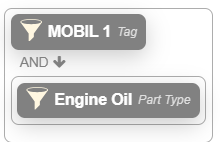 You can create oil change packages based on the brand with a Tag so it will only show Mobil 1 oils. You can create oil change packages based on the brand with a Tag so it will only show Mobil 1 oils.Example 2 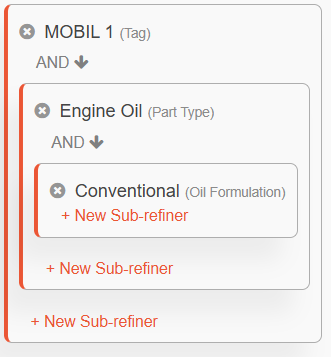 You can also add Oil formulation and/or Viscosity refiners to show those specific oils that have the Mobil 1 tag attached (be sure the item is tagged "Mobil 1" in the inventory). You can also add Oil formulation and/or Viscosity refiners to show those specific oils that have the Mobil 1 tag attached (be sure the item is tagged "Mobil 1" in the inventory). |
| Amsoil Euro | - Engine Oil Drain & Replace - Tag: AMSOIL EURO AND + Sub-refiner - Viscosity: 0w-20 OR + Sub-refiner - Viscosity: 0w-30 OR + Sub-refiner - Viscosity: 5w-30 OR + Sub-refiner - Viscosity: 5w-40 - Engine Oil Filter Remove & Replace - Part Type: Engine Oil Filter | 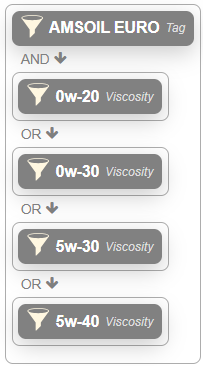 You could also narrow items by using a Tag refiner for the oil brand and Viscosity refiners to have the system to suggest select oils. |
| Bottled Oil | - Engine Oil Drain & Replace - Part Type: Engine Oil AND + Sub-refiner - Tag: BOTTLED OIL - Engine Oil Filter Remove & Replace - Part Type: Engine Oil Filter | 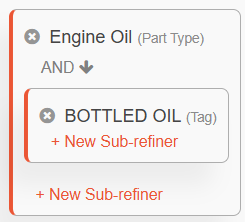 If you plan to use bottled oil items, you can add the Tag refiner "Bottled Oil" so that inventory items that are tagged Bottled Oil get shown in the package. If you plan to use bottled oil items, you can add the Tag refiner "Bottled Oil" so that inventory items that are tagged Bottled Oil get shown in the package. |
Other Common Packages
| Package | Services & Inventory Refiners |
| Cabin Air Filter | - Cabin Air Filter Remove & Replace - Part Type: Cabin Air Filter |
| Windshield Wipers | - Windshield Wiper Blade Remove & Replace - Part Type: Windshield Wiper Blade |
| Battery Replacement | - Battery Remove & Replace - Part Type: Vehicle Battery |
| Additive Services | - Additives - Tag: T111 (the tag is associated with the inventory item, i.e. True Max Engine Treatment). |
Was this article helpful?
That’s Great!
Thank you for your feedback
Sorry! We couldn't be helpful
Thank you for your feedback
Feedback sent
We appreciate your effort and will try to fix the article